

Effective 7 July 2026, the Package Designer is no longer available in Sitecore AI. As a result, creating and installing Sitecore packages through the Sitecore Client is no longer supported.
For many years, the Package Designer was one of the most widely used, simplest, and most reliable methods for transferring content between Sitecore environments. However, Sitecore has long provided an alternative through the Sitecore CLI, which supports content serialization and deployment in a more modern, automation-friendly manner.
With the removal of the Package Designer, organizations are encouraged to adopt the Sitecore CLI and the newer Content Transfer and Item Transfer APIs for moving content between Sitecore AI environments.
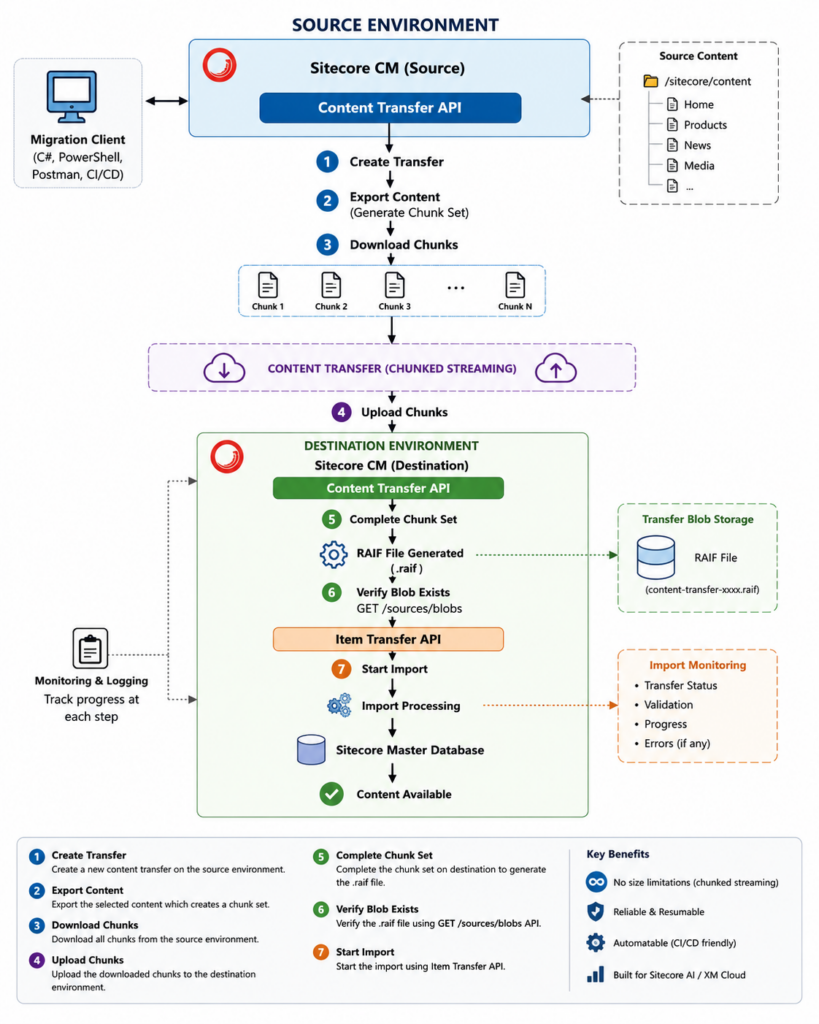
With the content transfer API uses chunked streaming there is no need to break large migrations into multiple smaller packages formelry we used to do this with the zip package. With the new approach a .raif file is created with the no manual file download or upload.
            SOURCE ENVIRONMENT
      +--------------------------------+
      |   Sitecore CM (Source)         |
      |                                |
      |  Content Transfer API          |
      +---------------+----------------+
                      |
            1. Create Transfer
                      |
                      ▼
              Transfer Service
                      |
            2. Export Content
                      |
                      ▼
             Chunk Set Created
                      |
            3. Download Chunks
                      |
                      ▼
           -----------------------
       Content Transfer (Chunked Streaming)
           -----------------------
            4. Upload Chunks
                      |
                      ▼
            DESTINATION ENVIRONMENT
      +--------------------------------+
      |  Content Transfer API          |
      +---------------+----------------+
                      |
           5. Complete Chunk Set
                      |
                      ▼
            RAIF File Generated
                      |
           6. Verify Blob Exists
             GET /sources/blobs
                      |
                      ▼
             Item Transfer API
                      |
           7. Start Import
                      |
                      ▼
           Import Processing
                      |
                      ▼
          Sitecore Master Database
                      |
                      ▼
           Content Available
0 Comments
1 Pingback