Tag: Content Migration

Sitecore AI Content Migration – Retrieve the transfer details

Once the transfer is complete you should be able to see the transferred items and their details. Along with this you can run a clean up process.

See the blog post on how to create a transfer in source environment – Link

See the blog post on how to consume chunks in destination environment – Link

To generate the Automation client and token see this blog post – Link

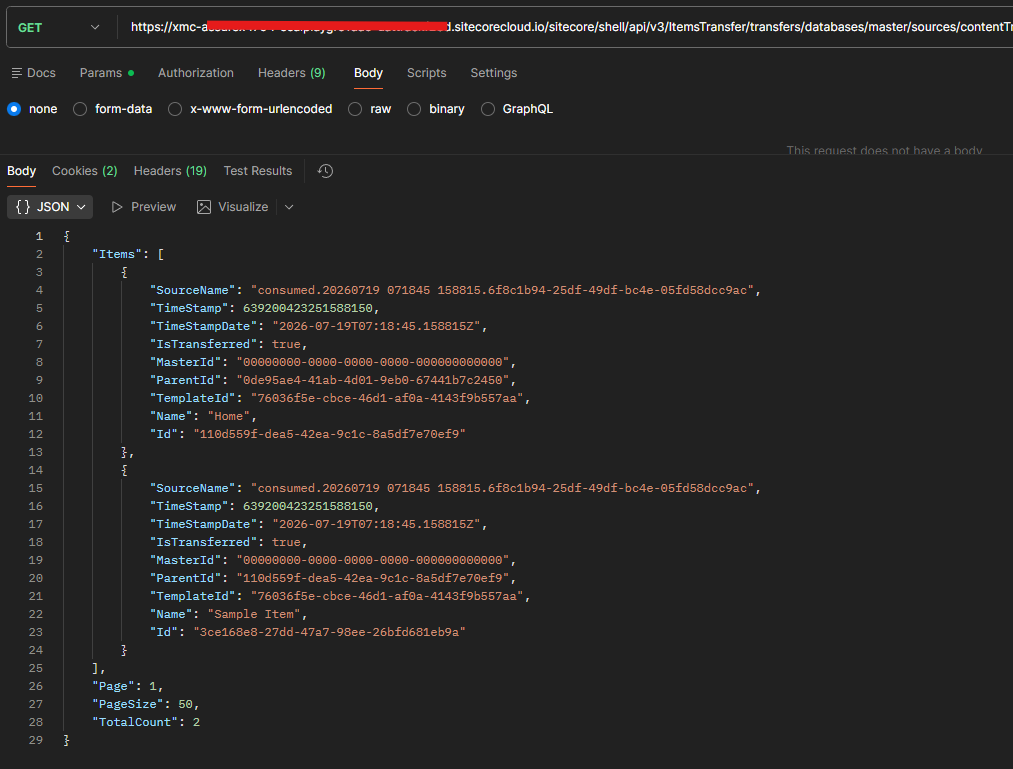
Retrieve Transferred Items

Http Method – GET

Url – https://your-xmc-instance.sitecorecloud.io/sitecore/shell/api/v3/ItemsTransfer/transfers/databases/master/sources/{sourceName}/items?page=1&pageSize=50

Example- https://your-xmc-instance.sitecorecloud.io/sitecore/shell/api/v3/ItemsTransfer/transfers/databases/master/sources/contentTransfer-1ec8122c-a25e-49b0-a0fb-bd47dfccdf8b-30fca7fa-0775-436f-957e-71b74b1ef6ef.raif/items?page=1&pageSize=50

Response –

{
    "Items": [
        {
            "SourceName": "consumed.20260719 071845 158815.6f8c1b94-25df-49df-bc4e-05fd58dcc9ac",
            "TimeStamp": 639200423251588150,
            "TimeStampDate": "2026-07-19T07:18:45.158815Z",
            "IsTransferred": true,
            "MasterId": "00000000-0000-0000-0000-000000000000",
            "ParentId": "0de95ae4-41ab-4d01-9eb0-67441b7c2450",
            "TemplateId": "76036f5e-cbce-46d1-af0a-4143f9b557aa",
            "Name": "Home",
            "Id": "110d559f-dea5-42ea-9c1c-8a5df7e70ef9"
        },
        {
            "SourceName": "consumed.20260719 071845 158815.6f8c1b94-25df-49df-bc4e-05fd58dcc9ac",
            "TimeStamp": 639200423251588150,
            "TimeStampDate": "2026-07-19T07:18:45.158815Z",
            "IsTransferred": true,
            "MasterId": "00000000-0000-0000-0000-000000000000",
            "ParentId": "110d559f-dea5-42ea-9c1c-8a5df7e70ef9",
            "TemplateId": "76036f5e-cbce-46d1-af0a-4143f9b557aa",
            "Name": "Sample Item",
            "Id": "3ce168e8-27dd-47a7-98ee-26bfd681eb9a"
        }
    ],
    "Page": 1,
    "PageSize": 50,
    "TotalCount": 2
}

Retrieve Transferred Item Details

Http Method- GET

Url- https://your-xmc-instance.sitecorecloud.io/sitecore/shell/api/v3/ItemsTransfer/transfers/databases/master/sources/{sourceName}/items/{itemID}

Example- https://your-xmc-instance.sitecorecloud.io/sitecore/shell/api/v3/ItemsTransfer/transfers/databases/master/sources/contentTransfer-1ec8122c-a25e-49b0-a0fb-bd47dfccdf8b-30fca7fa-0775-436f-957e-71b74b1ef6ef.raif/items/3ce168e8-27dd-47a7-98ee-26bfd681eb9a

Response –

{
    "Fields": [
        {
            "Version": 1,
            "Language": "en",
            "Value": "Sample Item for Content Transfer",
            "Id": "75577384-3c97-45da-a847-81b00500e250"
        },
        ...
    ],
    "SourceName": "consumed.20260719 071845 158815.6f8c1b94-25df-49df-bc4e-05fd58dcc9ac",
    "TimeStamp": 639200423251588150,
    "TimeStampDate": "2026-07-19T07:18:45.158815Z",
    "IsTransferred": true,
    "MasterId": "00000000-0000-0000-0000-000000000000",
    "ParentId": "110d559f-dea5-42ea-9c1c-8a5df7e70ef9",
    "TemplateId": "76036f5e-cbce-46d1-af0a-4143f9b557aa",
    "Name": "Sample Item",
    "Id": "3ce168e8-27dd-47a7-98ee-26bfd681eb9a"
}

OperationHTTP Method & EndpointDescriptionUse Case
List Transferred ItemsGET /transfers/databases/{databaseName}/sources/{sourceName}/itemsReturns a paginated list of items that have been transferred for an ongoing or completed transfer in the specified database and source.Use this endpoint to view all items included in a specific transfer and navigate through them using pagination.
Get Transferred Item DetailsGET /transfers/databases/{databaseName}/sources/{sourceName}/items/{itemId}Returns detailed information for a specific transferred item, including all captured metadata and localized/versioned field information for the given itemId, database, and source.Use this endpoint to inspect the complete details of an individual transferred item, including its field values, versions, and metadata.

Sitecore AI Content Migration – Consume the chunks in destination environment

See the blog post on how to create a transfer in source environment – Link

To generate the Automation client and token see this blog post – Link

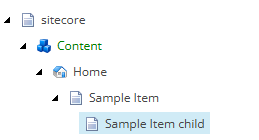
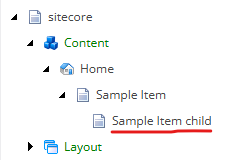
State of content tree in source environment

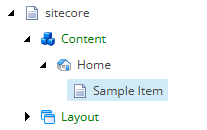
State of content tree in destination environment before migration

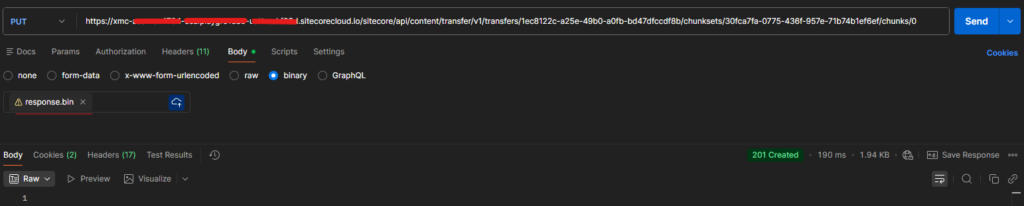
Step 1 – Save Data Chunk

Destination environment

Http Method – PUT

Url – https://your-xmc-instance.sitecorecloud.io/sitecore/api/content/transfer/v1/transfers/{transferID}/chunksets/{chunksetID}/chunks/{chunkID}

Example- https://your-xmc-instance.sitecorecloud.io/sitecore/api/content/transfer/v1/transfers/004d321e-1100-4e41-ad25-465fb304ee5a/chunksets/95e3b762-a002-4333-b141-13cdc513b1ee/chunks/0

Headers-

Content-Type: application/octet-stream

Authorization – token

Payload– Attach the file (response.bin)

Response-

201 – Created

This saves the chunck to the Azure Blob

Step 2 – Complete the chunk set 

Http Method- Post

Url- https://your-xmc-instance.sitecorecloud.io/sitecore/api/content/transfer/v1/transfers/{transferID}/chunksets/{chunksetID}/complete

Example – https://your-xmc-instance.sitecorecloud.io/sitecore/api/content/transfer/v1/transfers/1ec8122c-a25e-49b0-a0fb-bd47dfccdf8b/chunksets/30fca7fa-0775-436f-957e-71b74b1ef6ef/complete

Headers-

Authorization – token

Payload– Not Applicable

Response-

{
    "ContentTransferFileName": "contentTransfer-1ec8122c-a25e-49b0-a0fb-bd47dfccdf8b-30fca7fa-0775-436f-957e-71b74b1ef6ef.raif"
}

Note down the file name with extension raif

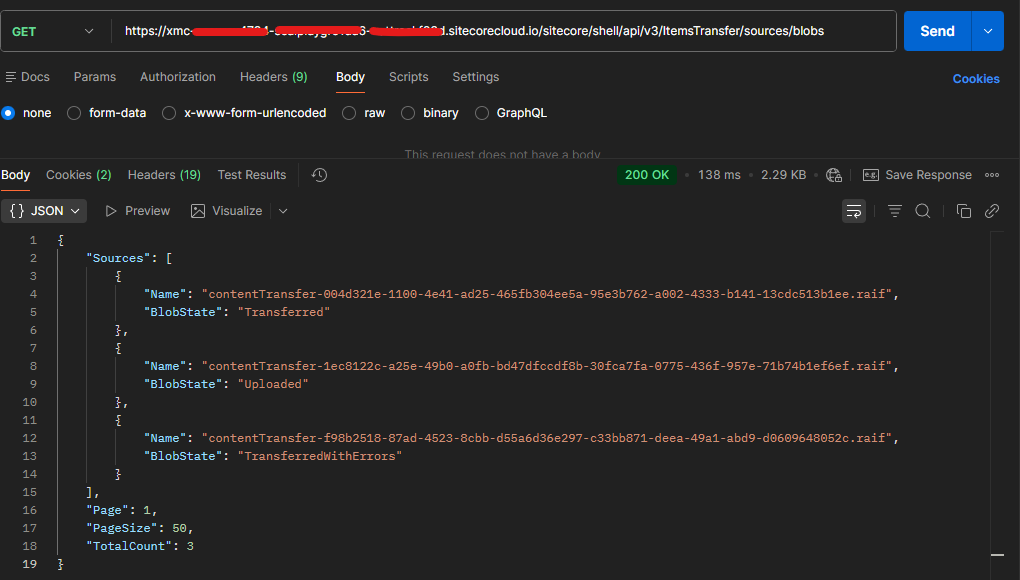
Step 3 – Verify the blob

Http Method- Get

Url- https://your-xmc-instance.sitecorecloud.io/sitecore/shell/api/v3/ItemsTransfer/sources/blobs

Headers-

Authorization – token

Response-

{
    "Sources": [      
        {
            "Name": "contentTransfer-1ec8122c-a25e-49b0-a0fb-bd47dfccdf8b-30fca7fa-0775-436f-957e-71b74b1ef6ef.raif",
            "BlobState": "Uploaded"
        }        
    ],
    "Page": 1,
    "PageSize": 50,
    "TotalCount": 3
}

Check the BlobState- Uploaded
Step 4 – Consume Blob (Transfer chunk)

Http Method- POST

Url- https://your-xmc-instance.sitecorecloud.io/sitecore/shell/api/v3/ItemsTransfer/transfers/databases/master/sources?blobName=contentTransfer-{transferID}{chunksetID}.raif

Example – https://your-xmc-instance.sitecorecloud.io/sitecore/shell/api/v3/ItemsTransfer/transfers/databases/master/sources?blobName=contentTransfer-1ec8122c-a25e-49b0-a0fb-bd47dfccdf8b-30fca7fa-0775-436f-957e-71b74b1ef6ef.raif
Headers-

Authorization – token

Response

202 – Accepted

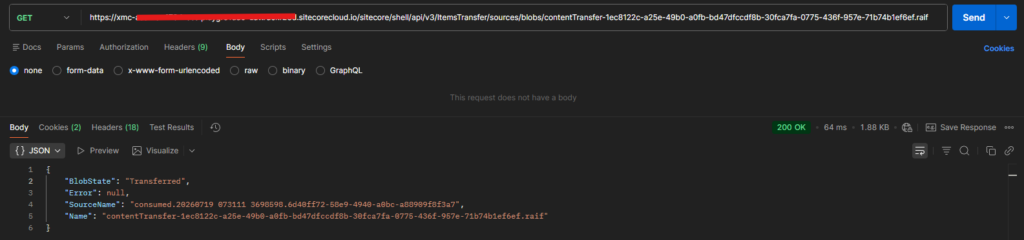
Verify the blob and you should see the BlobState changed to – Transferred. The earlier state was Uploaded

If transfer has issues ths state will be – TransferredWithErrors

  {
            "Name": "contentTransfer-1ec8122c-a25e-49b0-a0fb-bd47dfccdf8b-30fca7fa-0775-436f-957e-71b74b1ef6ef.raif",
            "BlobState": "Transferred"
        },

Monitor Transfer Status

Http Method – GET

Url – https://your-xmc-instance.sitecorecloud.io/sitecore/shell/api/v3/ItemsTransfer/transfers

Response –

{
    "Transfers": [        
        {
            "Id": "consumed.20260719 073111 3698598.6d40ff72-58e9-4940-a0bc-a88909f8f3a7",
            "SourceName": "contentTransfer-1ec8122c-a25e-49b0-a0fb-bd47dfccdf8b-30fca7fa-0775-436f-957e-71b74b1ef6ef.raif",
            "DatabaseName": "master",
            "ConsumedDate": "2026-07-19T07:31:11.3698598Z",
            "TransferState": "Finished",
            "Strategy": "OverrideExistingItem",
            "Description": null
        }        
    ],
    "Page": 1,
    "PageSize": 50,
    "TotalCount": 9
}

Post transfer-

You can also check the items that are transfered. In the next blog we will see how to check the items been transfered with the item details.

Sitecore AI Content Migration – Create transfer and chunks from source environment

To understand the end to end flow for migrating the content between environments, please see this blog post – Link

Pre-requisite – Automation Client and JWT Token

Before starting you will need the JWT token for the request to be made to the Content Transfer API. You should be Sitecore Admin or owner.

To generate the Automation client and token see this blog post – Link

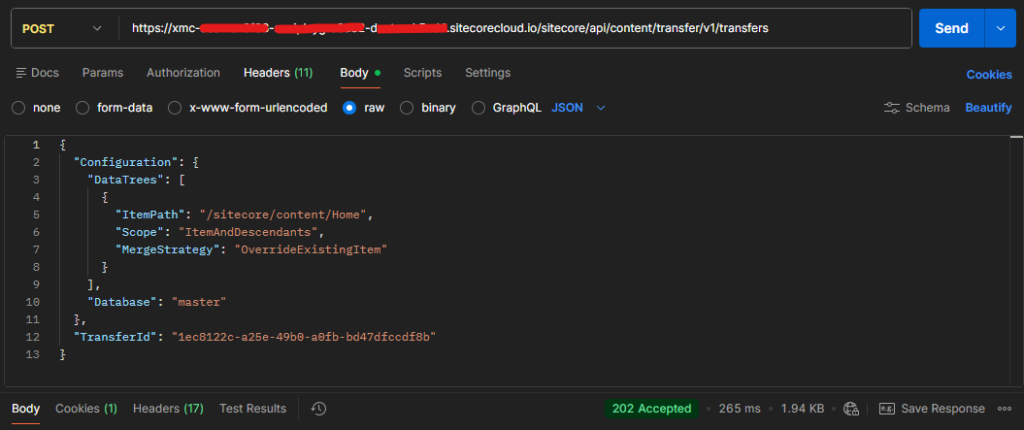
Step 1 – Create Transfer

Used in source environment

Request-

Http Method – POST

URL – https://your-xmc-instance.sitecorecloud.io/sitecore/api/content/transfer/v1/transfers

Headers

Authorization – Bearer token

Payload

{
  "Configuration": {
    "DataTrees": [
      {
        "ItemPath": "/sitecore/content/Home",
        "Scope": "ItemAndDescendants",
        "MergeStrategy": "OverrideExistingItem"
      }
    ],
    "Database": "master"
  },
  "TransferId": "1ec8122c-a25e-49b0-a0fb-bd47dfccdf8b"
}

Response

202 – Accepted

Note the Transfer ID – 1ec8122c-a25e-49b0-a0fb-bd47dfccdf8b

Transfer ID will be used in next API request.

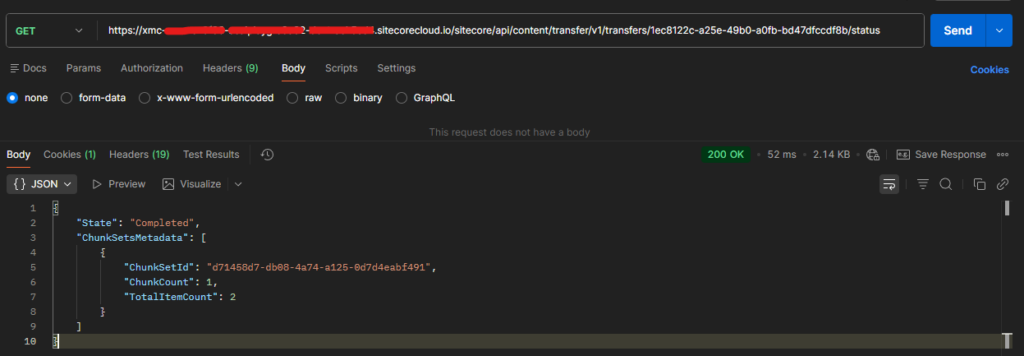
Step 2 – Get Content Transfer

Used in source environment

Get content transfer status or wait for the transfer to be ready

Request

Http Method – GET

Url- https://your-xmc-instance.sitecorecloud.io/sitecore/api/content/transfer/v1/transfers/{transferId}/status

Example – https://your-xmc-instance.sitecorecloud.io/sitecore/api/content/transfer/v1/transfers/1ec8122c-a25e-49b0-a0fb-bd47dfccdf8b/status

Headers

Authorization – token

Payload– Not Applicable

Response

{
    "State": "Completed",
    "ChunkSetsMetadata": [
        {
            "ChunkSetId": "d71458d7-db08-4a74-a125-0d7d4eabf491",
            "ChunkCount": 1,
            "TotalItemCount": 2
        }
    ]
}

Note the chunkSetId – d71458d7-db08-4a74-a125-0d7d4eabf491

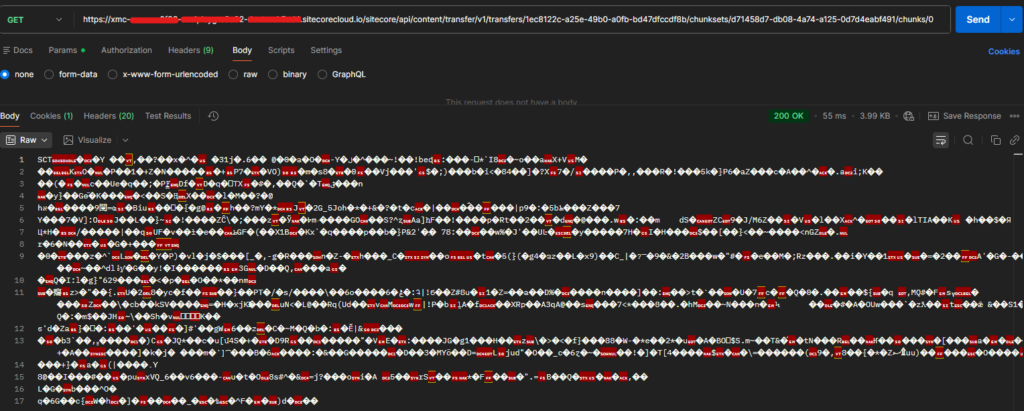
Step 3 – Retrieve a chunk

Used in source environment

Method- Get

Url – https://your-xmc-instance.sitecorecloud.io/sitecore/api/content/transfer/v1/transfers/{transferID}/chunksets/{chunksetID}/chunks/{chunkID}

Example – https://your-xmc-instance.sitecorecloud.io/sitecore/api/content/transfer/v1/transfers/1ec8122c-a25e-49b0-a0fb-bd47dfccdf8b/chunksets/d71458d7-db08-4a74-a125-0d7d4eabf491/chunks/0

Headers

Authorization – token

Payload – Not applicable

Response-

Save chunk –

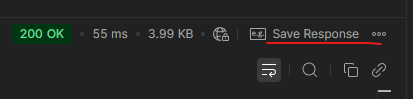
Save response to file (response.bin)

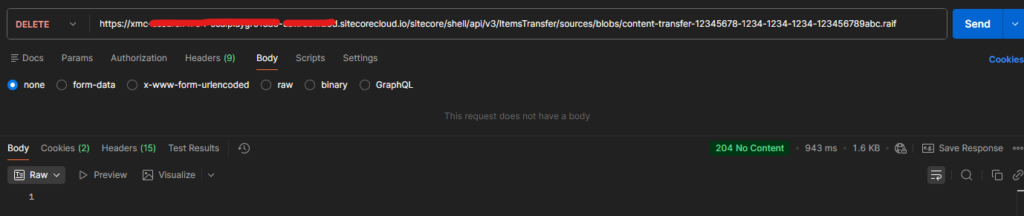
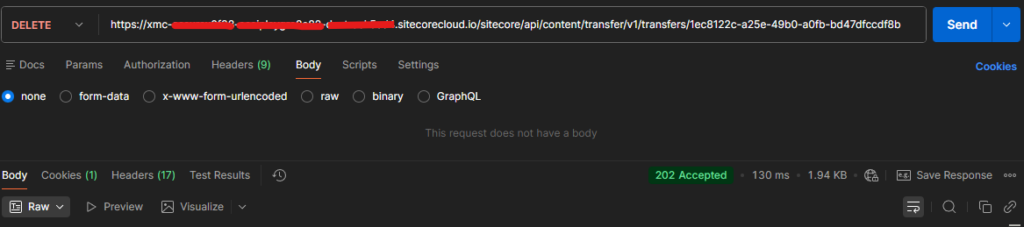
Delete the transfer

Used in source environment

Method – Delete

Url – https://your-xmc-instance.sitecorecloud.io/sitecore/api/content/transfer/v1/transfers/{transferID}

Example- https://your-xmc-instance.sitecorecloud.io/sitecore/api/content/transfer/v1/transfers/1ec8122c-a25e-49b0-a0fb-bd47dfccdf8b

Headers

Authorization – token

Payload – Not applicable

Response

202 Accepted

Summary of API’s

HTTP MethodAPI EndpointPurpose
POST/sitecore/api/content/transfer/v1/transfersCreate a new content transfer.
GET/sitecore/api/content/transfer/v1/transfers/{transferId}/statusRetrieve the status of a specific transfer.
GET/sitecore/api/content/transfer/v1/transfers/{transferId}/chunksets/{chunksetId}/chunks/{chunkId}Download or retrieve a specific chunk from a chunk set.
DELETE/sitecore/api/content/transfer/v1/transfers/{transferId}Delete or cancel a specific transfer.

References

https://developers.sitecore.com/changelog/sitecoreai/01072026/content-transfer-api-and-item-transfer-api-now-available

https://doc.sitecore.com/sai/en/developers/sitecoreai/deploying-sitecoreai/migrating-content-between-sitecoreai-environments.html#alternatives-to-other-package-designer-tasks

https://api-docs.sitecore.com/sai/content-transfer-api

https://api-docs.sitecore.com/sai/item-transfer-api

A Modern Approach to Sitecore Content Migration Using the Content Transfer API and Item Transfer API

Effective 7 July 2026, the Package Designer is no longer available in Sitecore AI. As a result, creating and installing Sitecore packages through the Sitecore Client is no longer supported.

For many years, the Package Designer was one of the most widely used, simplest, and most reliable methods for transferring content between Sitecore environments. However, Sitecore has long provided an alternative through the Sitecore CLI, which supports content serialization and deployment in a more modern, automation-friendly manner.

With the removal of the Package Designer, organizations are encouraged to adopt the Sitecore CLI and the newer Content Transfer and Item Transfer APIs for moving content between Sitecore AI environments.

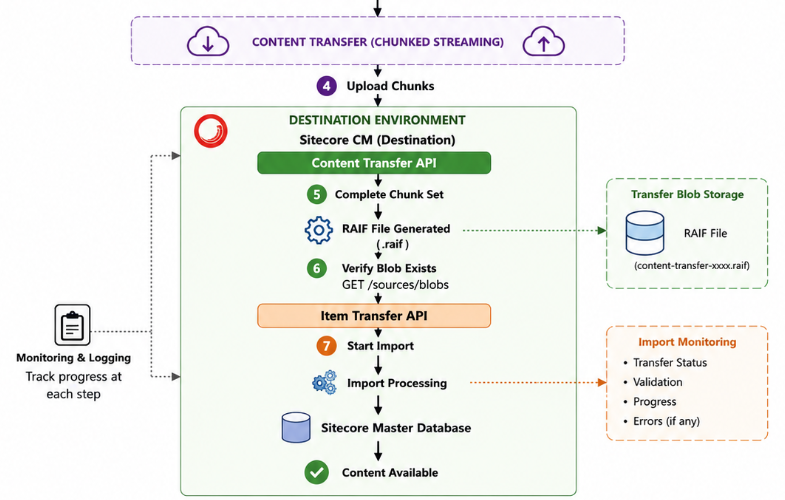
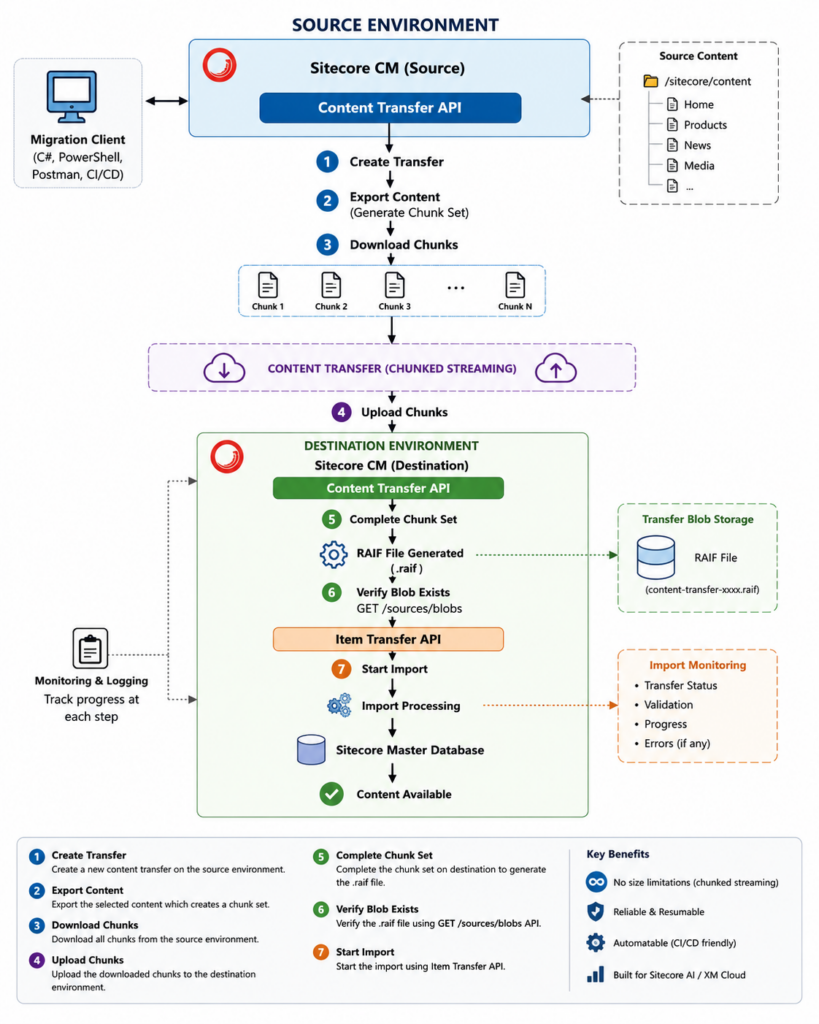
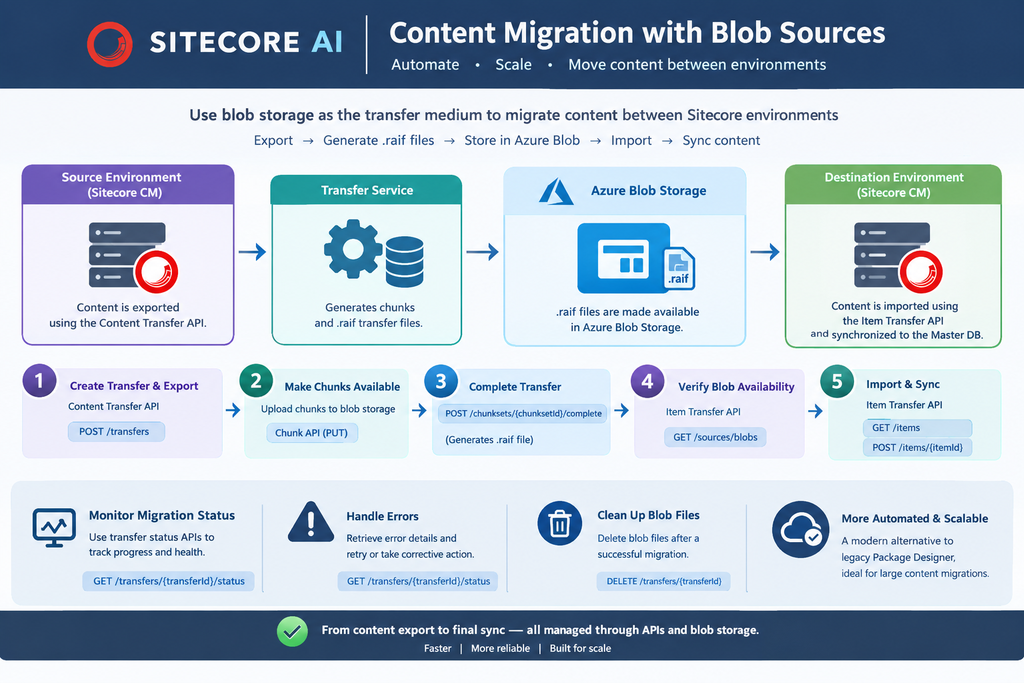
With the content transfer API uses chunked streaming there is no need to break large migrations into multiple smaller packages formelry we used to do this with the zip package. With the new approach a .raif file is created with the no manual file download or upload.

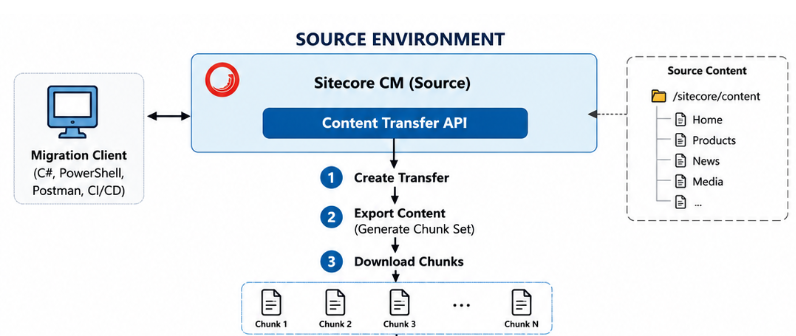
            SOURCE ENVIRONMENT
      +--------------------------------+
      |   Sitecore CM (Source)         |
      |                                |
      |  Content Transfer API          |
      +---------------+----------------+
                      |
            1. Create Transfer
                      |
                      ▼
              Transfer Service
                      |
            2. Export Content
                      |
                      ▼
             Chunk Set Created
                      |
            3. Download Chunks
                      |
                      ▼
           -----------------------
       Content Transfer (Chunked Streaming)
           -----------------------
            4. Upload Chunks
                      |
                      ▼
            DESTINATION ENVIRONMENT
      +--------------------------------+
      |  Content Transfer API          |
      +---------------+----------------+
                      |
           5. Complete Chunk Set
                      |
                      ▼
            RAIF File Generated
                      |
           6. Verify Blob Exists
             GET /sources/blobs
                      |
                      ▼
             Item Transfer API
                      |
           7. Start Import
                      |
                      ▼
           Import Processing
                      |
                      ▼
          Sitecore Master Database
                      |
                      ▼
           Content Available